FinOps Shift Left: How to Stop Cloud Bill Shock Before It Starts

In the traditional cloud operating model, velocity is everything. Developers deploy code, infrastructure spins up across AWS, Azure, or GCP, and value is delivered to customers. But this speed often comes with a costly lag: the financial impact of those engineering decisions isn't visible until the end of the month when the cloud bill arrives.
This is the "Reactive Loop," and for modern enterprises managing multi-cloud spend, it is no longer sustainable.
The industry is moving toward a new standard: FinOps Shift Left. Just as DevSecOps moved security "left" (earlier) in the software development lifecycle to catch vulnerabilities before production, cloud cost management is now moving into the Pull Request.
Here's what Shift Left means for your engineering culture, your cloud cost optimization strategy, and how modern FinOps platforms like SKYXOPS are operationalizing it with tools like Cost Guardrails.
The Core Concept: Prevention vs. Cure
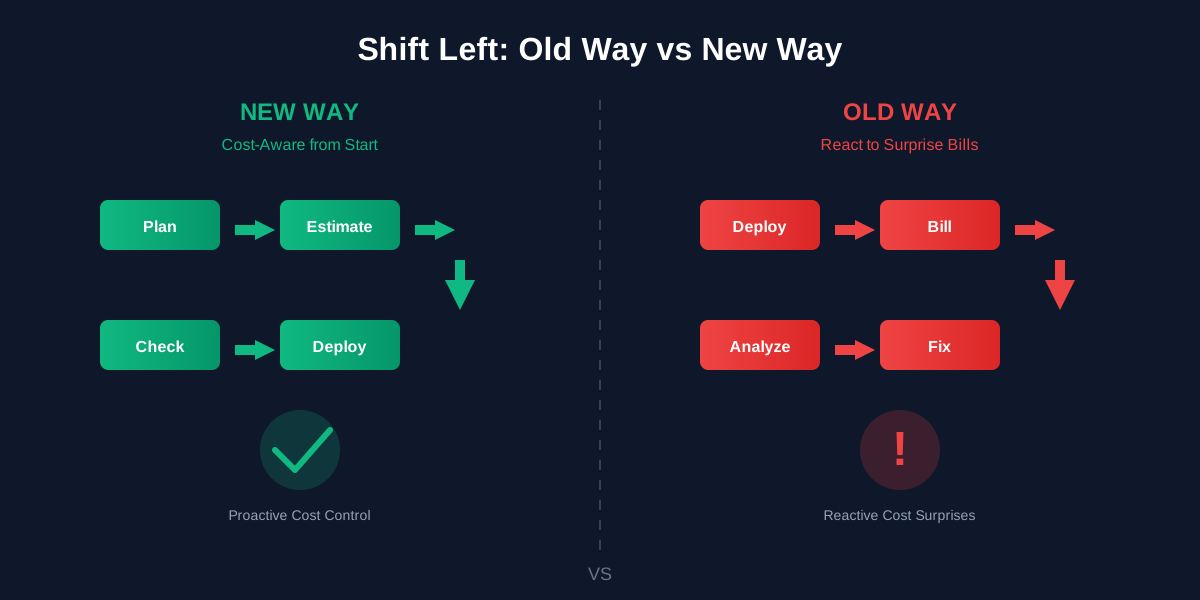
Traditionally, cloud financial management has been about cleaning up. You look at a cloud bill, identify waste (an idle EC2 instance, an over-provisioned RDS cluster) and ask an engineer to downsize it. This creates friction between FinOps teams and engineering.
Shifting Left changes the workflow:
- Old Way (Right): Deploy Bill Analyze Fix.
- New Way (Left): Plan Estimate Cost Check Budget Deploy.
By surfacing cloud cost data during the code review process, you help engineers to make infrastructure decisions that align with business profitability before a single dollar is spent. This is the foundation of proactive cloud cost optimization.
How It Works in Practice
To make FinOps Shift Left a reality, you need cloud cost management tooling that sits between your code repository (GitHub or GitLab) and your cloud environment. Let's look at how this workflow functions using SKYXOPS Cost Guardrails as our implementation model.
1. Visibility at the Source (The CI/CD Gate)
The first step in shifting left is immediate cost feedback. When a developer modifies an Infrastructure-as-Code (IaC) file, whether it's a Terraform plan or a CloudFormation template, the tooling should analyze the cost impact of those changes immediately.
SKYXOPS Cost Guardrails integrates directly into your CI/CD pipeline. Instead of a vague approval, the developer sees a clear, automated cost estimate comment on their Pull Request:
- Estimated Cost: "This change will add $450/month."
- Cost Delta: "This is a 15% increase over the previous version."
- Granular Breakdown: "Change is driven by upgrading RDS instance from db.m5.large to db.m5.xlarge."
Key Insight: This turns cloud cost into a first-class engineering metric, just like latency, uptime, or error rates.
2. Guardrails, Not Gates
Cost visibility alone isn't governance. The second pillar of shifting left is automated cloud spend policy enforcement. You don't want to block every cost increase, but you do want to block the accidental ones.
Using SKYXOPS's Budget policies, you can define cost governance rules that fit your organization's risk appetite:
- Soft Guardrails: If a PR increases cloud spend by less than 5%, simply warn the developer.
- Hard Guardrails: If a PR exceeds the Budget Headroom (the amount remaining in that specific service's allocated budget), block the deployment automatically.
This makes sure a simple typo, provisioning x1.32xlarge instead of t3.large, doesn't result in a five-figure cloud bill surprise.
3. Contextual Budgeting
A major challenge in cloud cost governance is context. A $1,000 monthly increase is alarming for a microservice but negligible for a core data pipeline processing petabytes.
Effective FinOps tools solve this with Hierarchical Budgets. SKYXOPS allows you to map cloud budgets from the Organization level down to the Business Unit, Team, and specific Service level.
When Cost Guardrails analyzes a PR, it checks against the specific budget allocated for that application or team, not a blanket organization-wide threshold. It answers the critical question: "Does this specific team have enough budget runway left for this deployment?"
The Cultural Impact
Implementing a FinOps Shift Left strategy is more than installing a bot in your CI/CD pipeline. It drives a cultural transformation across engineering and finance:
- Engineering Control: Developers stop seeing FinOps as "the people who yell about cloud costs" and start seeing them as partners who provide guardrails. Cost-awareness becomes a shared responsibility, not a blame game.
- Faster Innovation: Paradoxically, cost guardrails make teams move faster. Knowing that Cost Guardrails will catch a massive budget overrun gives teams the confidence to deploy without fear of bill shock.
- Predictable Cloud Forecasting: When you know the cost impact of every feature before it launches, your cloud financial forecasting moves from guesswork to precision. CFOs and engineering leaders finally speak the same language.
- Reduced Cloud Waste: By catching over-provisioned resources at the PR stage, you eliminate waste before it ever hits your cloud bill, not weeks later during a cost review.
Conclusion
The future of cloud cost management is not in better dashboards; it is in better pipelines. By shifting FinOps left, you move from auditing cloud waste to preventing it, saving your organization both money and engineering time.
Tools like SKYXOPS Cost Guardrails are leading this transition by embedding cloud financial intelligence where it belongs: in the hands of the builders, at the moment decisions are made.