Know the cost before it ships.
Cost Guardrails reads the infrastructure change in your pull request, prices it against a live rate card, and hands the answer back to your pipeline, while the change is still a proposal.
How it works
A change moves through five stages: code, pull request, CI, deploy, production. Cost Guardrails sits outside that pipeline. It reads the change at the pull request and in CI, prices every resource against a live cloud catalog, checks it against the budget that owns it and the headroom left, then returns a decision before the deploy. The decision is pass, route to the budget owner, or deny, and all of them are logged. Your pipeline is what acts on the decision.
Your pipeline acts on the decision: hard-block or warn-and-proceed, whichever you configure.
The change gets priced
- Reads the Terraform, CloudFormation or Helm change itself
- Projects a monthly figure per resource from a live pricing catalog
- Actual instance type, region and hours, not a rough estimate
Your budget policy decides
- Projection measured against the budget that owns the scope
- Within headroom: passes straight through
- Over: warn or deny, routed to the budget owner
Your pipeline acts on it
- SKYXOPS returns a decision; your pipeline acts on it
- Stop the change, let it through with a warning, or ask for a named sign-off
- Every override leaves an audit trail
What a priced change looks like
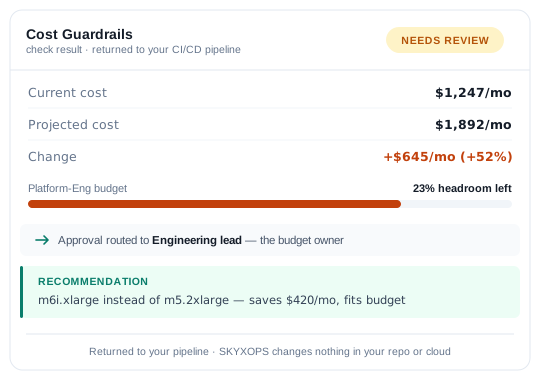
The result comes back as structured output your pipeline can act on, and as a readable summary for whoever has to approve it.
- Projected monthly cost and the delta against current spend
- Remaining headroom on the budget the change touches
- The approver it routed to, and why that person
- A cheaper alternative when one exists, with the saving quantified
Reads the infrastructure you actually write
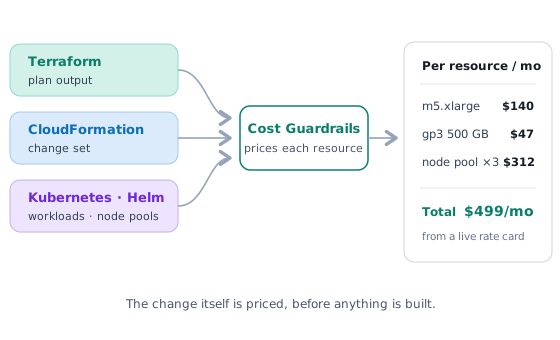
Cost Guardrails works on the change itself, not on a separate description of it that drifts out of date.
- Terraform: plan output and module changes
- CloudFormation: stack and change-set diffs
- Kubernetes and Helm: workload and node-pool changes
- Per-resource projection from a live rate card, not a static table
Fits the pipeline you already run
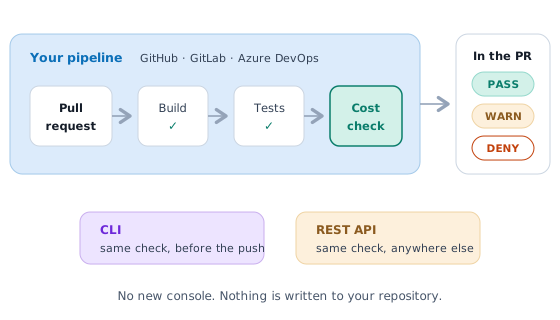
There is no new console for engineers to learn. The check runs where their work already runs, and the result appears where they already look.
- GitHub, GitLab and Azure DevOps
- A CLI for local runs before a change is even pushed
- A REST API when you need the check somewhere else
- Returns a decision to the caller. SKYXOPS writes nothing to your repository
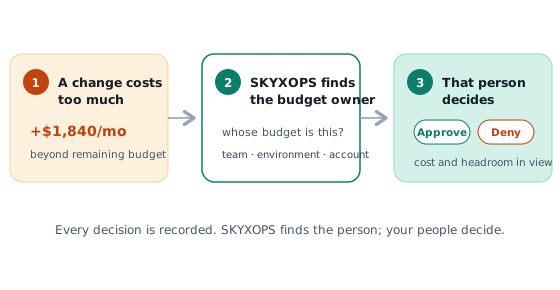
Approval goes to whoever owns the money
A cost decision routed to the wrong person is a decision that sits. Rules configured in SKYXOPS send each change to the owner of the budget it touches.
- Routing by budget scope: team, cost centre, environment, account
- The approver sees the impact on remaining headroom before deciding
- Overrides are allowed and recorded, not blocked
- Approvals go to your people; SKYXOPS never approves anything itself
Nested budgets, not one number
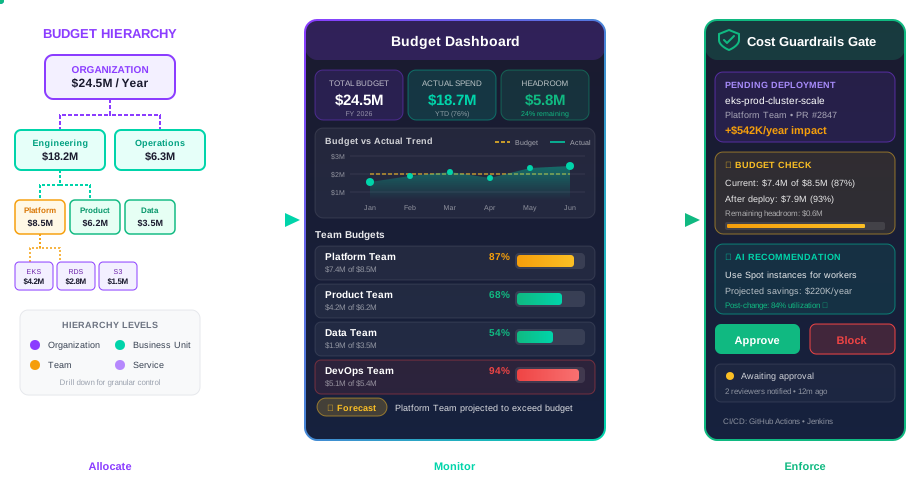
A single organisation-wide budget tells nobody anything they can act on. Budgets here nest, so each level sees its own picture and the levels above still add up.
- Organisation department team project service
- A budget at any level, with spend rolling up through all of them
- Separate budgets per environment where production and dev are funded differently
- Periods that match your finance calendar, not the vendor's
Headroom an approver can see
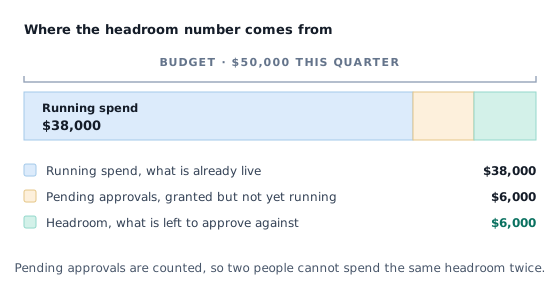
This is the part most budget tools cannot do, because they only see spend after it happens. Headroom here reflects approved-but-not-yet-running commitments.
- Remaining headroom per scope, updated as approvals are granted
- The approver sees the impact of the change in front of them before deciding
- Pending approvals visible so two people cannot spend the same headroom twice
- Overrides recorded against the budget they affected